Building the UI for an Industrial Cleaning Machine
I led front-end development on a production-grade React application that served as the main touchscreen interface for a commercial ride-on cleaning machine. Designed more like an embedded operating system than a typical web dashboard, the UI supported real-time robotics communication and exposed complex maintenance workflows through a resilient interface.
Built for users with limited onboarding and mixed digital literacy, the interface had to be intuitive, robust, and operable through a touchscreen, external buttons, and a scroll wheel. I built the full front-end architecture, including state management, error handling, and runtime type safety. I also implemented multilingual support, a custom design system, and resilient UX patterns for dynamic machine behavior.
System Architecture & Safety
Communicating with Robotics Back End
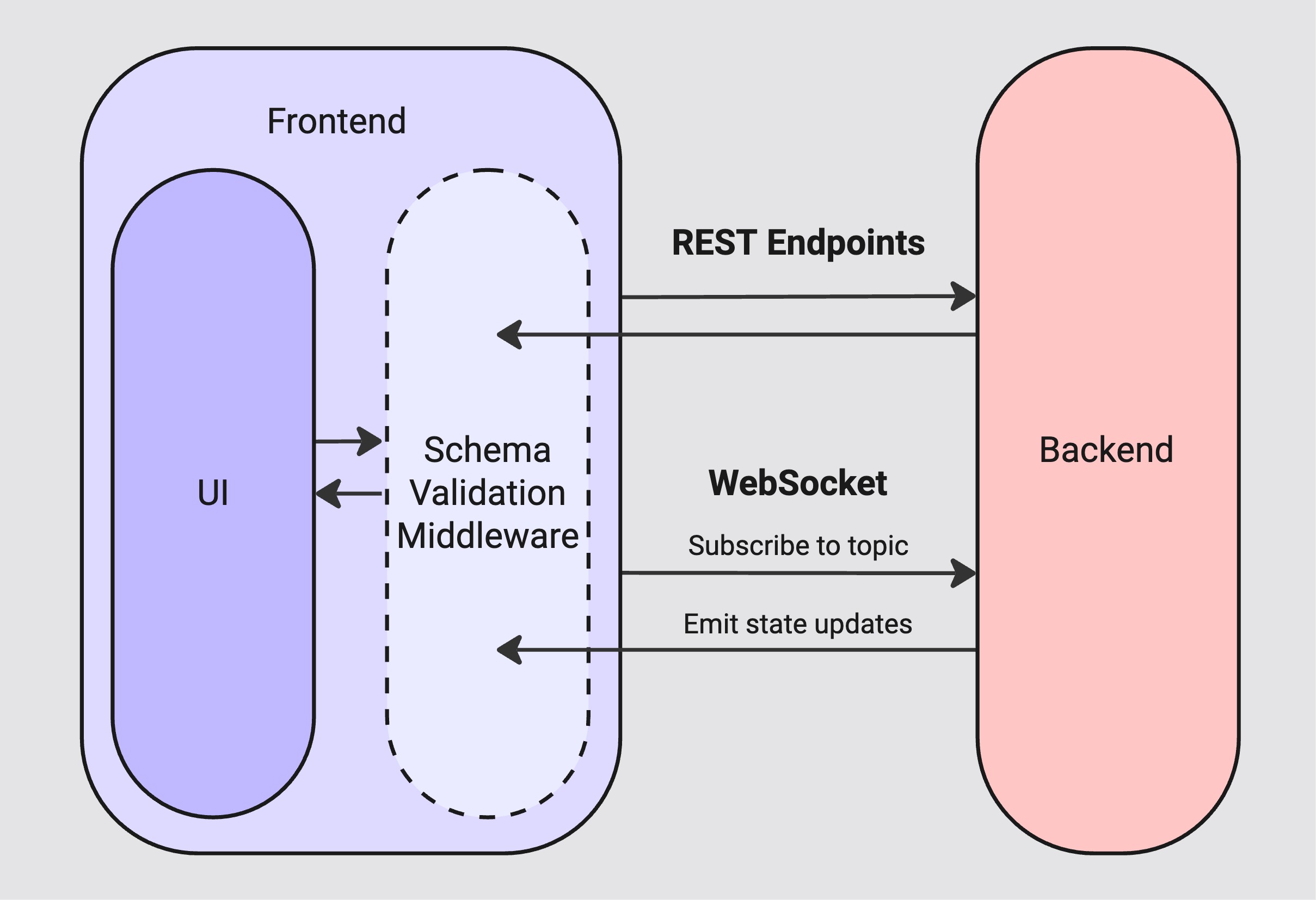
To decouple development and support rapid iteration, I worked with the back-end team to define a hybrid interface consisting of REST endpoints and a topic-based WebSocket pub/sub model to support. This allowed the front end and back end to work in parallel while adhering to a shared schema.
For real-time communication, we avoided the common pitfall of overloading the front end with continuous low-value data. Instead, the front end subscribed to specific topics only when that data was needed, and unsubscribed when it was not. This minimized overhead and ensured the interface remained performant, even as machine complexity grew.
This architecture also enabled me to spin up a local mock back end that followed the same schema, which was critical for front-end development in cases where back-end features weren’t yet implemented or the physical machine was unavailable.
Guaranteeing Runtime Type Safety
In this system, a malformed back-end response could result in a non-recoverable failure on a production machine. TypeScript provided compile-time safety, but runtime guarantees were critical for everything coming in over the network. To ensure reliability, I used a library that generated Zod validation schemas directly from our OpenAPI definitions. This allowed for validate every HTTP and WebSocket payload in real time and recover gracefully from invalid data, closing the loop of type-safety.
// Subscribe to a WebSocket topic with runtime type safety.// Invalid payloads are logged and removed to prevent stale UI state.const subscribeToTopic = <T extends TopicKey>(topic: T) => {const schema = schemas[topic];const handleMessage = (raw: unknown) => {const result = schema.safeParse(raw);if (result.success) {webSocketStore.set(topic, result.data);} else {webSocketStore.clear(topic);console.warn(`[${topic}] Received invalid payload:`, result.error.format());}};socket.on(topic, handleMessage);socket.send('SubscribeToTopic', topic);};
Machine Errors and User Experience
The interface needed to gracefully handle a wide range of known and unknown machine states. In a typical web application, an unexpected state might result in a broken feature or temporary UI inconsistency. In this environment, the same failure could leave an industrial machine in an inoperable or even unsafe state.
To mitigate this risk, the front-end, back-end, and design teams worked closely to define the schema of machine error codes for key operations. Known error states mapped cleanly to purposeful front-end behavior, like a specific dialog or flow interruption. This collaboration allowed us to build a system where machine behavior, UI state, and user understanding remained in sync.
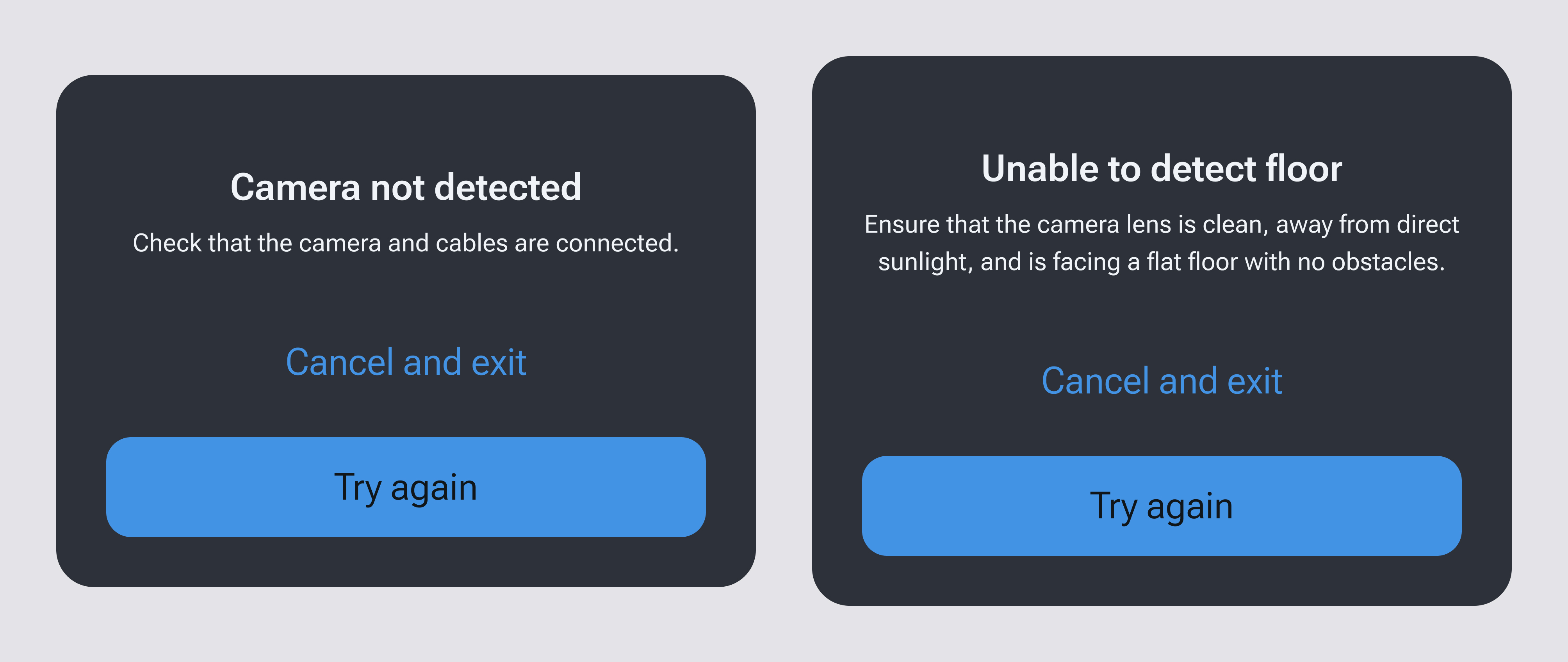
For unclassified or rare errors, I implemented a fallback system that could surface generic failure states without crashing or misleading the operator.
We also shaped experiences around state data and reflected that directly in the interface. For example, when the machine sent a list of available cleaning modes, each mode’s availability state was respected in the UI. If a mode was marked unavailable due to a system fault or dependency, the UI clearly reflected that status through visually distinct states and behaviors, ensuring what the operator saw always matched the machine’s actual capabilities.
Advanced Localization
I began with a standard i18n framework for React, but extended it significantly to support a multilingual industrial user base with diverse script systems. The interface respected both the system language and user-specific settings, and adapted in real time based on those preferences.
The framework handled complex localization challenges, including pluralization rules, right-to-left (RTL) layout support, and number formatting across various regional formats. Because many features displayed numeric data prominently (e.g., values, units, status readings), unit interpolation was handled with care, including accounting for whether the unit appears before or after the value, or whether a space is included.
Formatting concerns were also separated from back-end payloads, allowing front-end control over grouping and decimal precision so the UX remained clear, accurate, and context-sensitive.
// Format a number using localized grouping and decimal precision,// and interpolate the formatted value into a translation string.const { t } = useTranslation();const { n } = useLocalizedNumber({ useGrouping: true, maximumFractionDigits: 1 });const unitId = 'meter';const value = 12345.678;const valueToDisplay = t(`unit:length.${unitId}_withValue`, { value: n(value) });
Scalable Design System
To ensure visual consistency across a broader fleet of machines while maintaining long-term front-end scalability, our team developed a lightweight custom design system. It was grounded in the product’s brand identity and expanded to handle the higher level of complexity required for the machine.
I brought Figma design tokens over to the front end to enforce consistent usage of spacing, color, and typography across the app. These tokens were used in both Sass and TypeScript, allowing for strict value control in layouts and component logic. I also created a custom Figma plugin to export a single icon library file containing cleaned SVGs, which were consumed by a flexible Icon component. This allowed color and size to be controlled dynamically in code, and eliminated the need for manual asset updates.
Reflection
This project required deep attention to system reliability, real-world constraints, and user clarity. I focused on delivering an interface that was as stable and scalable as it was intuitive. The result was a fully custom front-end OS that is robust, flexible, and purpose-built for real-world operators in critical environments.